

Every speed bag. Live on your gym TV.
Gym Floor turns one phone or tablet into the hub for up to 8 Speedbag Champ bags. Live counts, pace and a class round bell, mirrored to your TV. Members don't need an app or an account. They just punch.
Your speed bags are the loudest corner of the gym.
Members give them a few rounds and walk away.
Nobody sees the work.
No clock, no bell, no score.
At the end of the month, all you've got to show for it is the noise.
Gym Floor puts every bag in the room on one live board, and turns every punch into a number your gym owns.
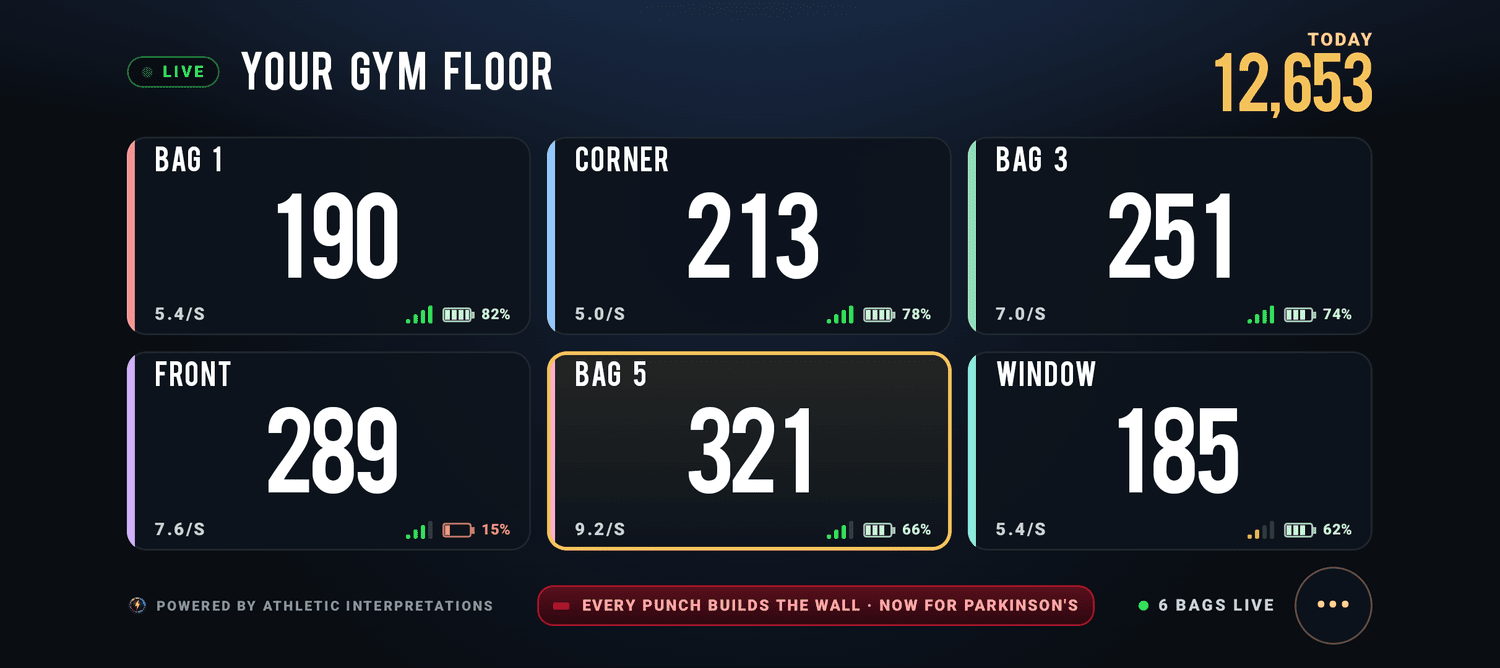
This is what goes on your TV.
Tap through the three views your members will see: open floor, a class round and the TV board. Then use the TRY IT buttons to ring the bell, let a bag doze off, drop one out or hit a milestone, and watch how the floor handles it.
Every bag. One screen. Your TV.
One phone runs up to 8 speed bags on your floor: a live count on every station, a class timer that starts every bag on one bell, and a scoreboard for the gym TV. Members just punch. No app, no account.
Open training on every bag at once. Each station shows its count, pace, signal and battery, and tells your staff when a bag needs a punch, a charge or a moment to re-link.
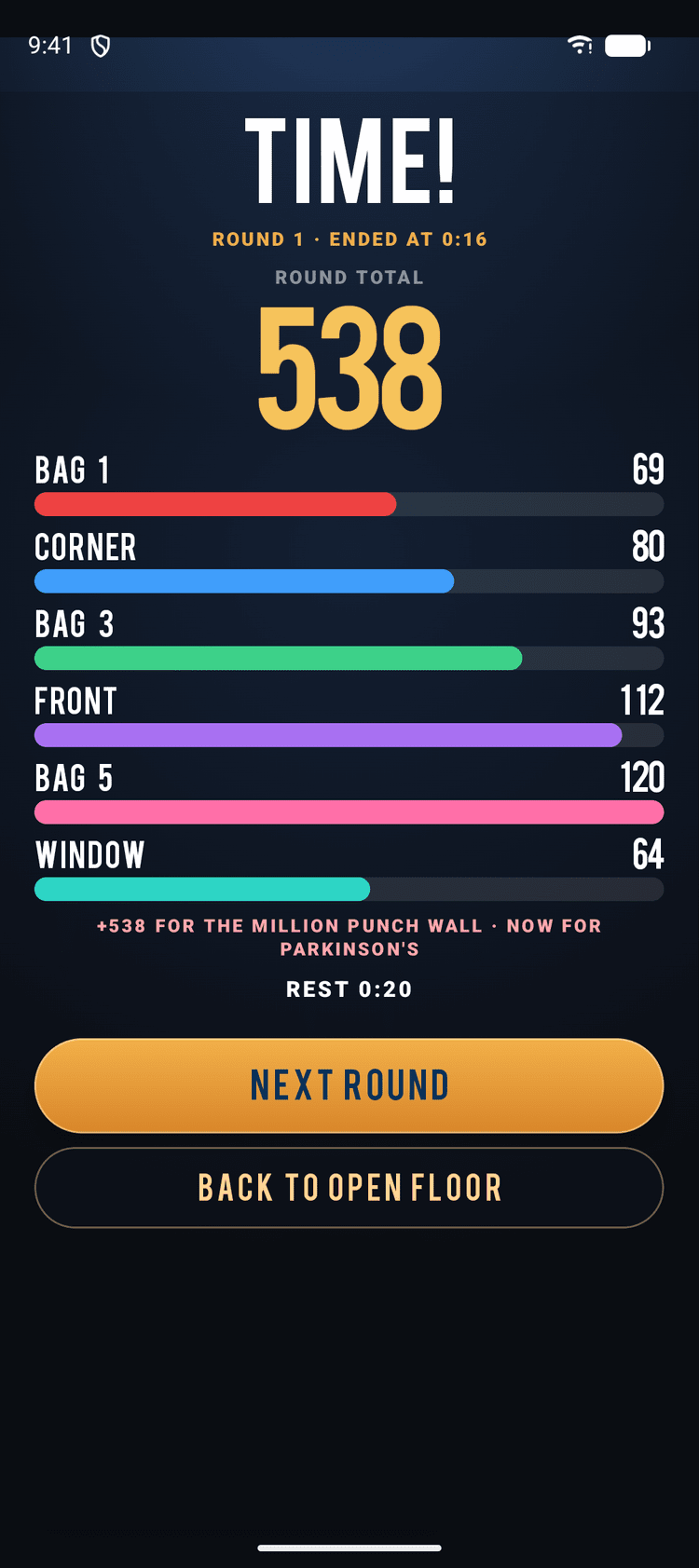
Pick a round length and press START ROUND. Every bag starts on one bell, the clock turns red for the last 10 seconds, and TIME! shows every station's total. The demo clock runs fast until the final 10 seconds.
OFF waits for NEXT ROUND after each round.
Tap TV or turn the phone sideways, mirror it to the gym TV, and the whole floor becomes a live scoreboard with your gym's name on top.
Floor punches build your gym's totals and the Million Punch Wall, never a member's personal stats. Members need no app and no account. They just punch.
Live demo, simulated: station names, counts and totals are examples, and the demo round clock is sped up. Gym Floor runs in the Speedbag Champ app on iPhone, iPad and Android phones and tablets, with a Speedbag Champ smart counter on every bag. Athletic Interpretations sets it up and switches it on for your gym.
Demo gym. Punches are simulated.
On the board in three steps.
- 1 · We switch your floor on
Tell us your gym and the Speedbag Champ account you'll run it from. We link the account and turn Gym Floor on for you. There are no codes and nothing to buy in the app.
- 2 · Add your bags
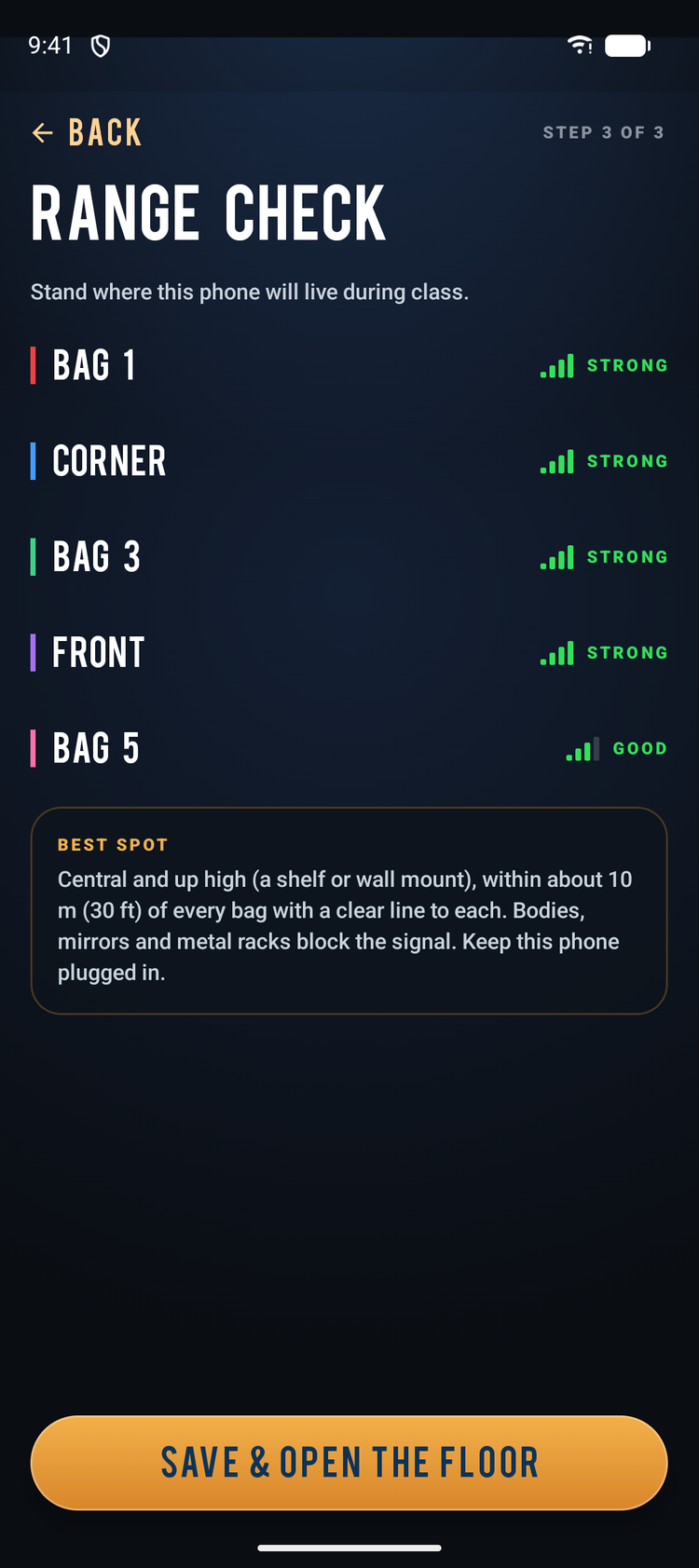
Open Gym Floor on your phone or tablet. It finds the bags nearby and shows the signal and battery for each one. Punch a bag and its card flashes HIT! Then give it a name members know, like Corner, Window or Ring Side. Punch the bags left to right and that becomes their order on the TV. A quick range check shows where the phone should live.
You do this once. After that, the bags reconnect on their own.
- 3 · Put it on the TV
Mirror the phone to the gym TV. Use AirPlay on iPhone and iPad, or Screen Cast or Chromecast on Android. Tap TV and the full board fills the screen. Open the floor, or ring the first bell.
One floor. Three ways to run it.
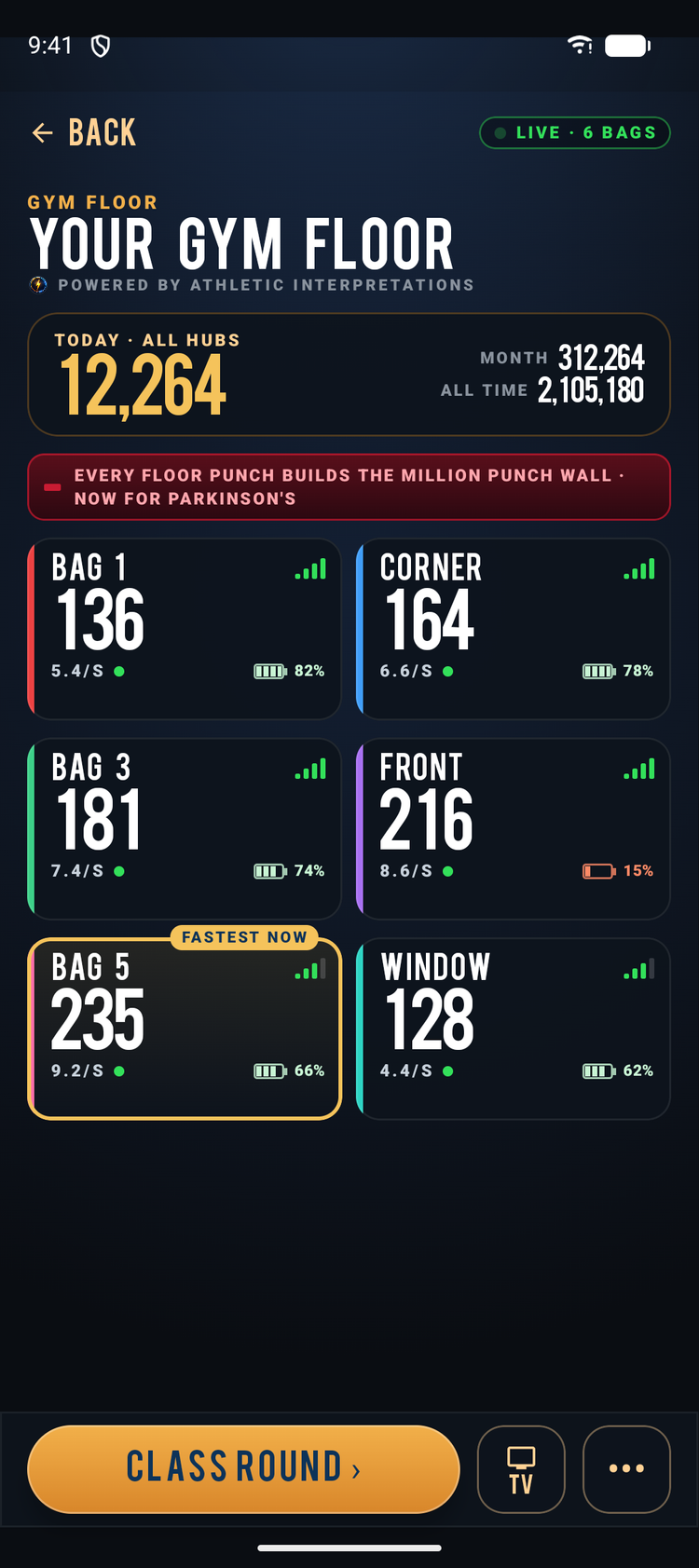
Open Floor: Everyone trains. Everything shows.
Every bag runs at once, and every station gets its own live tile with count, pace in hits per second, signal and battery.
- On the bigger tiles, a heat bar runs teal, turns gold at 7 hits/sec and orange at 9 and up.
- The fastest bag at 7+ hits/sec wears a gold FASTEST NOW tag. It marks the bag, not the person.
- Your gym's punches for TODAY, THIS MONTH and ALL TIME run across the top.
- On an iPhone, all 8 stations fit on one screen. No scrolling.
- The screen stays awake on its own.
Class Round: One bell. Every bag.
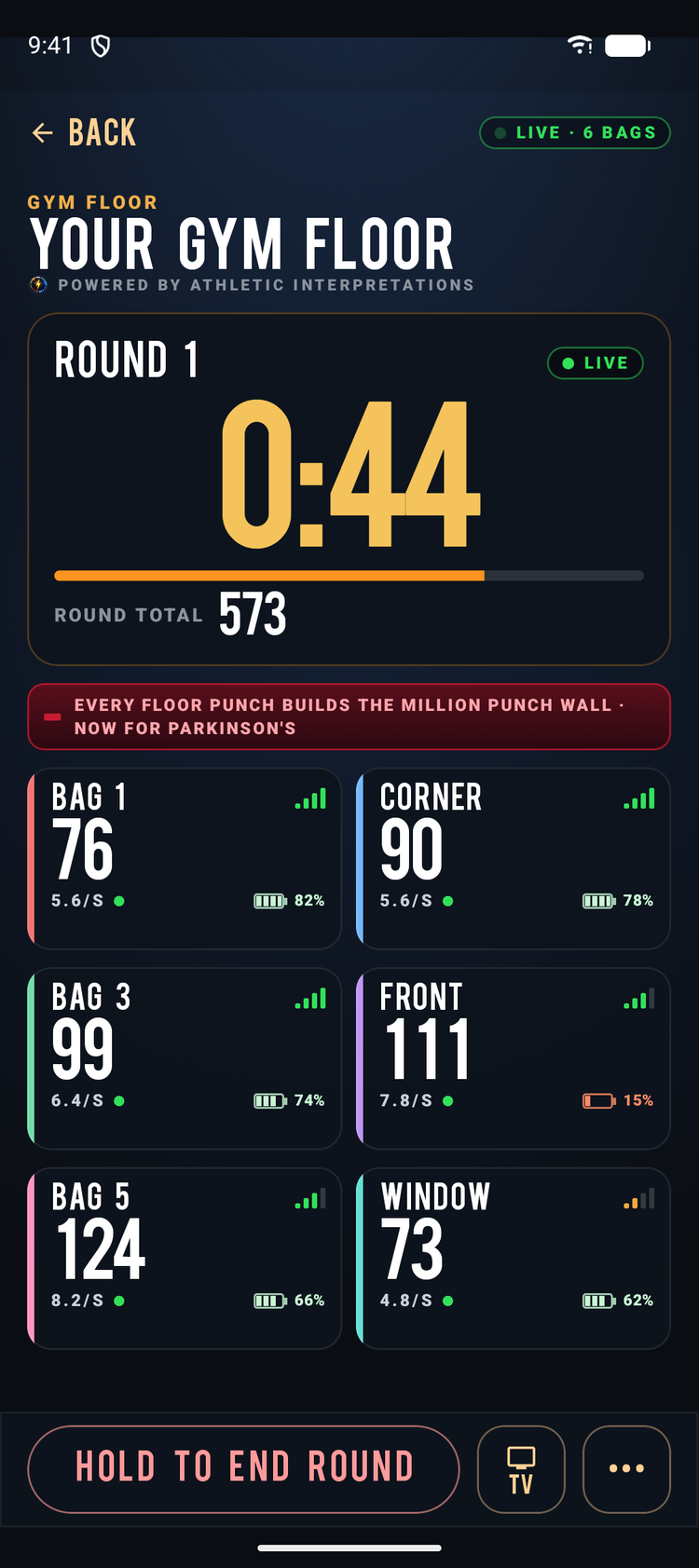
Turn any class into rounds. Pick a round from 1 to 5 minutes. Rest can be off, 0:30 or 1:00.
- A 10-second lead-in calls GET TO YOUR BAGS, then counts 3 · 2 · 1.
- One bell starts every bag on the phone. Running two hubs? Start each hub's round on that hub.
- With 10 seconds left, the clock turns red and the clapper sounds.
- TIME! Triple bell.
- Results show the ROUND TOTAL and a bar for each station, in station order with no crown. It's the room's number, plus what the round added to the Million Punch Wall.
- If rest is on, the next round starts by itself.
- On iPhone and iPad, the bell plays through the TV over AirPlay and mixes with your gym music.
TV Board: Your gym, on air.
Turn the phone sideways or tap TV and the scoreboard takes the whole screen.
- ● LIVE and your gym's name sit up top (YOUR GYM FLOOR), with today's gym total in gold.
- The grid picks the biggest numbers your screen can fit for the number of bags you have.
- The digits are fixed-width, so they never jitter.
- Every 1,000 gym punches in a day, a gold milestone band drops across the board. Every 10,000 brings confetti.
- Every board carries POWERED BY ATHLETIC INTERPRETATIONS and the Million Punch Wall line.
- The board shifts slightly every 3 minutes to protect your TV from burn-in.
What you need. And what you don't.
You need
- A Speedbag Champ counter on every bag. Both counter generations work: V4 units and the LED screen units.
- One phone or tablet for up to 8 bags. That can be an iPhone, iPad, Android phone or tablet, or a Mac running the iPad app.
- More bags or a bigger room? Add another phone or tablet as a second hub. Every hub feeds one gym total.
- A spot for the hub within about 10 m (30 ft) of its bags. Central, up high, and plugged in.
- A TV the hub can mirror to: an Apple TV or AirPlay TV for iPhone and iPad, or a Chromecast or cast-ready TV for Android.
- Internet to sync your gym totals. If it drops, the floor keeps counting and syncs later.
Your members need
Nothing.
No app. No account. No sign-up. They walk up and punch.
Built for a busy floor
Every tile tells your staff what to do, in plain words.
- SLEEPING SOON · 1:42 · GIVE IT A PUNCH On battery, a bag sleeps after 20 minutes without a punch. Its tile warns you 2 minutes ahead with a countdown. One punch resets it.
- ASLEEP · FLIP THE SWITCH Flip it off and on. The bag relinks by itself with no taps, and its count picks up where it left off.
- LOW BATTERY · CHARGE AFTER CLASS This shows at 20% or below.
- WEAK SIGNAL · MOVE THE PHONE CLOSER The bag still counts, but moving the phone closer heads off dropouts.
- OFFLINE If the Wi-Fi goes down, punches are saved on the phone and sync when you're back.
- Short dropouts don't cost the count. If a bag relinks within 20 seconds, the punches thrown in the gap are credited.
What your members see.
- Their bag, under the name you gave it.
- Their count climbing live, in big TV digits.
- On the bigger tiles, the heat bar going teal, then gold, then orange as they speed up.
- During open floor, the gold FASTEST NOW tag moving around the room.
- Your gym's total for today in gold, climbing with every bag.
- The bell: GET TO YOUR BAGS, then 3 · 2 · 1 and GO, a red last ten seconds, and TIME!
- The round result: the room's total and a bar for every station.
- A gold milestone every 1,000 punches of the day, and confetti every 10,000.
What they'll never see: their name, their face, or a ranking of people. The floor tracks stations, not people.
Every punch counts for your gym.
TODAY, THIS MONTH and ALL TIME, added up across every hub. The day rolls over at your gym's own midnight.
Every floor punch also builds the Million Punch Wall.
Send us a short public name, up to 24 characters. Once we approve it, your gym gets its own line on the Million Punch Wall feed, updated up to once an hour.
No punch is ever counted twice, and totals can't climb faster than the bags can physically count.
The floor never identifies who is punching. Floor punches never touch anyone's personal stats, a member's or yours.
We're setting up our first gyms one at a time. Want yours on the list?
Get Gym Floor for your gymWhat does it cost, and how do I start?
We're setting up founding gyms directly, one at a time. Email us your gym name and how many bags you have, and we'll walk you through it. We set Gym Floor up for you and bill your business by invoice. There's nothing to buy inside the app.
How many bags can I run?
Up to 8 bags per phone or tablet. For more bags, or bags spread across a big room, add another phone, tablet or Mac as a second hub. Each hub shows its own bags on its own screen, and every hub feeds one gym total. Class rounds run per hub, so you start each hub's round on that hub.
How do I get it on the TV?
With screen mirroring.
- iPhone or iPad: open Control Center, choose Screen Mirroring and pick your Apple TV or AirPlay TV. Then tap TV.
- Android: open Quick Settings and choose Screen Cast, or use Google Home and Cast my screen, to reach your TV or Chromecast. Then tap TV.
Keep the phone plugged in, because mirroring stops if the phone locks. The app walks you through the steps.
Do my members need the app or an account?
No. Members need no app and no account. They walk up and punch. Only the accounts we link for your gym can run the floor.
Does it need Wi-Fi? How far away can the bags be?
The bags don't use Wi-Fi. They talk to the hub over Bluetooth, so keep them within about 10 m (30 ft) with a clear line to the hub. Put the hub central and up high, because bodies, mirrors and metal racks block the signal. The built-in range check rates every bag STRONG, GOOD, FAIR or WEAK from where the phone will sit.
The hub uses the internet to sync your gym totals and wall credit. If it drops, the floor keeps counting and syncs when you're back. For AirPlay, put the TV on the same Wi-Fi as the phone.
What happens if a bag falls asleep?
On battery, a bag sleeps after 20 minutes without a punch. Two minutes before that, its tile shows SLEEPING SOON with a countdown, and one punch resets it. If it does sleep, flip its switch off and on. It relinks by itself with no taps, and its count carries on.
What about privacy?
The floor tracks stations, not people. It never identifies who is punching, members give no names or sign-ins, and FASTEST NOW marks a bag, not a person. Floor punches are never added to anyone's personal stats.
What's stored is about the gym:
- your gym name and station names
- your gym's punch totals by day and month
- a live view of each station (count, pace, signal, battery) while the floor runs, removed when the floor ends
- a record of each hub device: its label (like IPHONE), platform, app version and the account that set it up
Your gym and station names and your totals show on screens in your gym. Publicly, your gym's approved short name and punch count can appear on the Million Punch Wall. Our analytics are aggregate only. To have your Gym Floor data removed, email support@athleticinterpretations.com. Full details in our privacy policy.
Can members still connect their own phone to a bag?
Not while the floor has it. A bag talks to one hub at a time. When you end the floor, the bags disconnect and are free for members' own phones again.
Put your speed bags on the board.
We're setting up founding gyms now. Tell us about your floor and we'll take it from there.
Or email support@athleticinterpretations.com
Gym Floor · Powered by Athletic Interpretations